 English
 Română


History of HTML
HTML was first created by Tim Berners-Lee, Robert Cailliau and others starting in 1989. The latest version is known as HTML5.
What is HTML and what does it look like?
HTML is the abbreviation that represents the acronym for the notion of HyperText Markup Language, which is a basic, descriptive language, the code that is the basis for creating HTML documents. HyperText Markup Language is a markup language used to create web pages that will be displayed in a browser and its purpose is to present information in paragraphs, tables, fonts or colors rather than describing the semantics of the document. From the name of this notion we can draw significant conclusions about the HTML language.
HyperText Markup Language is made up of two notions:
HyperText;
The notion of Hypertext refers to the way in which pages are mutually connected by using links that direct to other HTML documents. Hypertext is the notion that marks such a link, that is, such a connection.
Markup Language.
HTML is the markup language, respectively the so-called Markup language (eng. markup language), which means that HTML is used to execute the marking of the text document through the use of tags, which tell the browser how to display the content. A markup language is a way for computers to talk to each other to control how text is processed and presented. To do this, HTML uses two things: tags and attributes.
What are HTML tags?
Tags are used to mark the beginning of an HTML element and are usually enclosed in angle brackets.
What are HTML attributes?
Attributes contain additional information. Attributes take the form of an opening tag and additional information is placed inside it.
What is the role of HTML?
The html language is used to define the structure of an HTML document. To perform such a task, the HTML language has a large number of different tags used to define sections in the HTML document. By combining different tags, the structure of an HTML document is built, based on which the program that will parse such a document (most often the web browser), knows how to display the page.
A simple HTML page has the following structure:
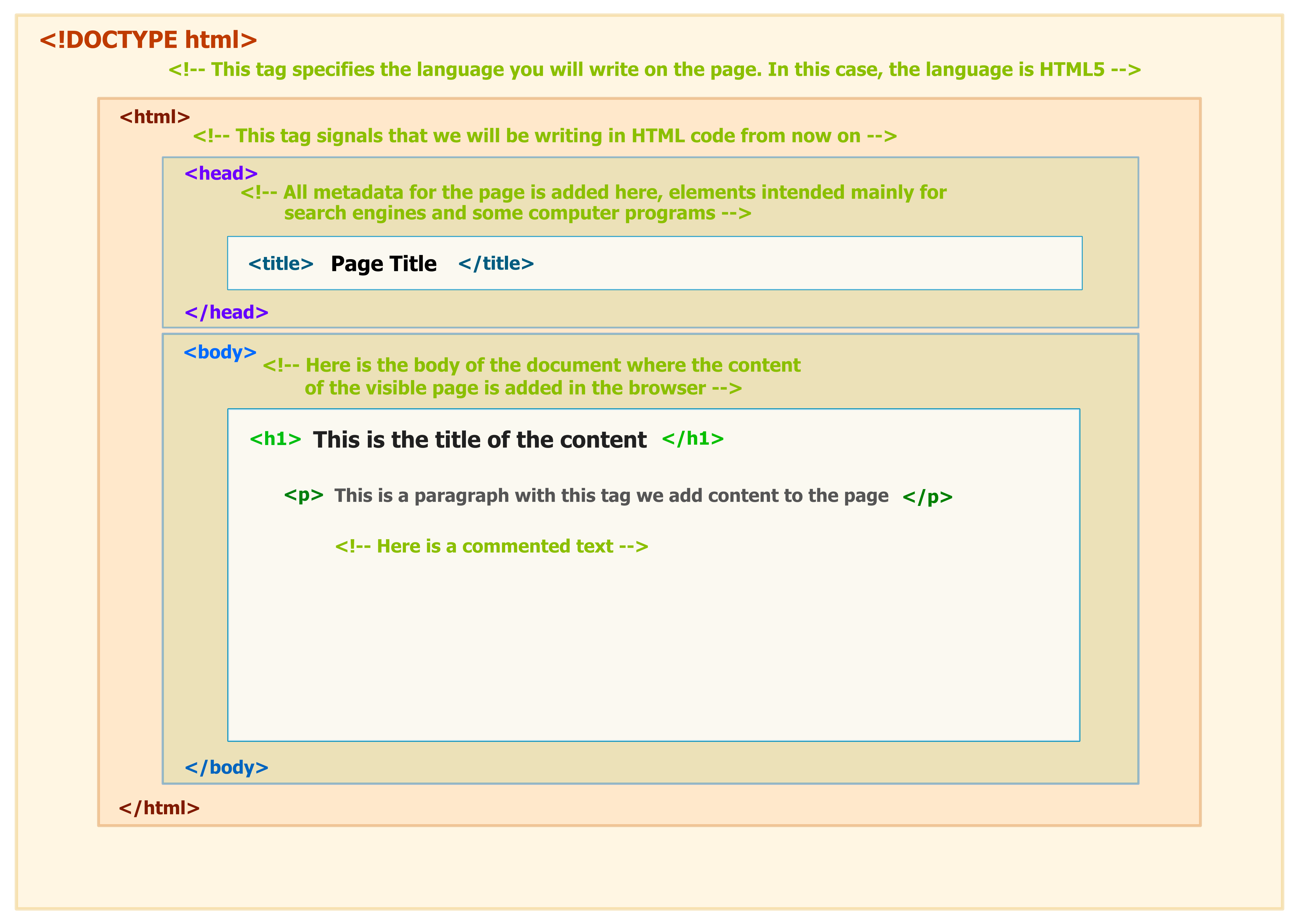
Analyzing this image, we can conclude that the text within the h1 tag is interpreted by the browser in a special way - it is bolded and written with a larger font.
Within the HTML code, in the example, two paragraph elements are defined, using the
tags. This element is interpreted by the browser as a paragraph, and in the image you can see that the content of this tag is presented as a separate paragraph. From what has been presented so far, we can conclude that based on the HTML tags, the browser parses the HTML document and creates a corresponding display.
How to add links in HTML
As you may have noticed, the internet is made up of a lot of links. Almost everything you click while surfing the web is a link that takes you to another page on the site you're visiting or to an external site. Links are enclosed in an attribute opened by the tag. This element is the first one I've come across that uses an attribute, so it looks different from the previously mentioned tags.
How to Add Images in HTML
In today's modern digital world, images are everything. The "IMG" tag has everything you need to display images on your site. Just like the "A" anchor element, "IMG" also contains an attribute that contains information for your computer regarding source , height , width and the image alt text.
How to make an HTML list
In web design, there are 3 different types of lists you may want to add to your site.
Ordered list
The first is an "OL" : This is an ordered list of content.
Inside the "OL" tag we list each item in the list inside the "LI" "/LI" tags
Unordered list
The second type of list you might want to include is an unordered "UL" list. This is better known as a bulleted list and does not contain numbers.
List of definitions
Finally, you may want to include a list of "DL" definitions on your page.
How to add a table
When we draw a table we need to open an element with the opening tag "TABLE". Inside this tag, we structure the table using the table rows, "TR" and the cells, "TD". The HTML document itself cannot provide much to a user, other than a simple analysis of the information. Often, there is a need to retrieve certain information from the user, these being
transmitted for further processing, be it processing on the server, by a server technology, or using local client scripts. In such situations, in HTML forms help us.
What are HTML forms?
Forms are a simple tool for collecting information from visitors to a website and allow users to send comments and questions, request information, register for a newsletter, complete an online application or enter information for payment, for the purchase of a new product.
How do HTML forms work?
The actual HTML form does not provide any functionality, but only a type of template for collecting information. When the user fills in the form within an HTML document, the collected data is transmitted to the script that performs the processing of the transmitted data.
How to create HTML forms?
The HTML form is created using the form element. The form element is constructed by using the opening tag "FORM" and the closing tag "/FORM". The form element can contain attributes that determine how it works.
URL action
Defines the location to which the form data must be sent.
GET and POST methods
Defines the HTTP method that will be used to transmit form data.
enctype: application/x-www-form-urlencoded, multipart/form-data, text/plain
Defines how the data will be encoded during transmission to the server; this option is effective only if the POST method is used for sending.
Of all the attributes displayed above, the action and method attributes are used the most. The action attribute defines to whom the form data will be sent. The method attribute defines the way in which the data will be transmitted and it can have two values:
GET - while using the GET method, the form data is sent to the server via the URL
POST - when the POST method is used to submit the form, the data is stored in the body of the HTTP request.
HTML form elements
The form tags shown are just containers for the elements that can be found within the HTML form. Therefore, the form element can contain one or more elements such as: input, textarea, button, select, fieldset and label
The specified elements are responsible for the collection and transmission of data.
On today's web, forms are one of the elements of websites and web applications, which can be found in the most diverse forms, when we talk about their appearance. The HTML language provides almost no possibility to influence the appearance of forms and its elements. This is achieved through use
CSS language and will be explained specifically in one of the following articles of this category.
Comments
Профессиональный сервисный центр по ремонту бытовой техники с выездом на дом.
Мы предлагаем: сервисные центры в москве
Наши мастера оперативно устранят неисправности вашего устройства в сервисе или с выездом на дом!
Профессиональный сервисный центр по ремонту бытовой техники с выездом на дом.
Мы предлагаем: ремонт крупногабаритной техники в москве
Наши мастера оперативно устранят неисправности вашего устройства в сервисе или с выездом на дом!
Профессиональный сервисный центр по ремонту бытовой техники с выездом на дом.
Мы предлагаем: сервисные центры в москве
Наши мастера оперативно устранят неисправности вашего устройства в сервисе или с выездом на дом!
Профессиональный сервисный центр по ремонту бытовой техники с выездом на дом.
Мы предлагаем: сервис центры бытовой техники москва
Наши мастера оперативно устранят неисправности вашего устройства в сервисе или с выездом на дом!
Add New Comment